Minggu, 16 Januari 2011

Lenovo IdeaCentre Q150

Lenovo’s ultra-compact IdeaCentre Q150 represents what may very well be one of the smallest and most-affordable PCs for practical use on the market. Obviously, one would expect some trade-offs in terms of performance, but Lenovo has packed some surprising media-playback horsepower into the Q150’s polished, diminutive form factor.

Hardware

Our review unit came specced with an Intel Atom D510 running at 1.6GHz and two gigs of DDR3 RAM to power the Windows Home Premium 32-bit OS. A recovery partition occupies 30 gigs of the 500GB hard drive. It has built-in 802.11b/g/n wireless LAN as well as a gigabit Ethernet port. Nvidia’s Ion GPU brings 512MB of video processing. The unit has no optical drive or card reader, but comes with a small USB keyboard and mouse. Lenovo also supplied us with one of the company’s N5901 wireless controllers, though it does not come standard.

With a street price of $350, the Q150 is even cheaper than some barebones systems.

Design

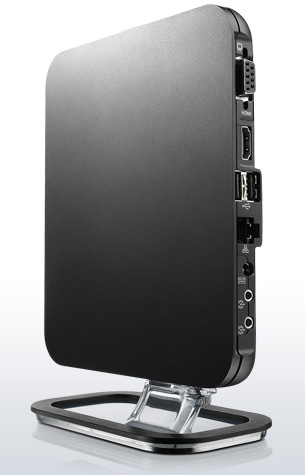
Though the Q150 has an attractive design and satisfying heft, the standout attribute is the machine’s compact size. Lenovo had to forego an optical drive and card reader to trim the inches, but thankfully there are enough ports to connect just about anything: two USB 2.0 ports and an S/PDIF optical output underneath a small flap on the front, and two more USB 2.0 ports, Ethernet, VGA-out, HDMI-out, and headphone & mic jack on the rear.

Accessories

Inside the box, Lenovo includes a stand for using the machine in a vertical orientation, as well as a VESA bracket for mounting it on the rear of a monitor.

The included USB mouse and keyboard work fine, but the wires are so short that you’ll almost have your nose up against your TV screen if you set up the Q150 near your A/V components. The N5901 hand-held control worked okay for point-and-clicking, but typing on it proved annoying, given the tiny keys and lack of backlighting. We would much prefer that the Q150 come with a Bluetooth keyboard and mouse (or at least a backlit remote for use in a dim home theater setting).

Software

Except for McAfee Security Center, we found a desktop thankfully free of bloatware upon the first boot. You’ll want to either activate or uninstall the McAfee suite right away, as you’ll get a nag screen every five minutes or so if you don’t.

Lenovo’s decision to opt for the 32-bit flavor of Windows 7 Home puzzled us, since all the hardware supports 64-bit.
Performance

As a media-playback device, the Q150 performs admirably for its small size and low-voltage components. It had no problems playing 1080p video files and high-fidelity audio files, or streaming Divx files over a Wi-Fi network. However, apart from very basic operations like word processing and light Internet browsing, any task requiring even moderate processing power revealed the Q150’s shortcomings. Despite the Atom processor’s dual cores, the Q150 struggled to keep up when multitasking or crunching lots of numbers. ITunes alone took over four minutes just to install.

Similarly, encoding from one media format to another often moved at a glacial pace, something that will no doubt frustrate those using the Q150 as an HTPC. In many cases, it would be faster to do the transcoding on one’s main desktop or laptop PC and then transfer the media files to the Q150 via a thumbdrive than to let the Q150 do all the work.

Newegg.com sells a version of the Q150 loaded with Windows XP Home for $219, and we can’t help but wonder how a lighter OS load might improve performance.

Conclusion

As a media player, the Lenovo IdeaCentre Q150 performs quite well. The unit’s small stature and multiple mounting options make it a solid choice for installation in a location short on space, and its good looks hold up nicely against home theater components.

On the other hand, its anemic processor delivers some bottom-of-the-barrel performance in multitasking and encoding roles, two areas that power users will sorely miss.

However, if you can live with the Q150’s limitations, the $350 price tag is tough to beat.

Highs:

  • Small footprint and several mounting options
  • Great looks
  • Smooth 1080p video playback
  • Affordable
  • Quiet
  • Convenient OS recovery should disaster strike

Lows:

  • Poor multitasking and encoding performance
  • Lacks good backlit remote
  • No TV tuner

Sabtu, 15 Januari 2011

SAMSUNG Introduces New 9 Series Thin And Light Laptop WIth Stunning Superbright Plus Display And Premium Design

All-new Durable Design and Long Battery Life Create Capable Computing for Professionals On-the-Go

middleImage
Series 9 Series 9
A subsidiary of Samsung Electronics Corporation, today announced the 9 Series, a durable, ultra premium, lightweight laptop computer at the International Consumer Electronics Show in Las Vegas. The 13.3-inch 9 Series offers mobile professionals and power users a sophisticated laptop equally suited for work and entertainment. Thanks to a stunning design, Samsung’s hallmark SuperBright Plus display and Intel performance processing power, the notebook ushers in a new era in mobile computing.

Unparalleled Styling
The 9 Series is made from material known as Duralumin, typically found in advanced aircrafts and offers construction quality twice as durable as aluminum, all while keeping the laptop weight under 3 lbs. To develop the 9 Series with the use of this new material, Samsung created an exhaustive testing process to ensure that the notebook is not only extremely sturdy, but also constructed with the perfect look and feel for technology savvy users.

The 9 Series’ naturally flowing design takes cues from the sleek styling and sophisticated beauty of a premium sports car. The silhouette evokes thoughts of speed and performance with an ultra-thin 0.64 inch profile. Additionally, the naturally flowing arch maximizes the laptop’s ergonomic appeal, making it easier to use and a natural fit for the human grip.

Ultra Vivid Display
The 13.3-inch 9 Series features a LED-backlit screen, offering users the highest quality visual experience expected from Samsung, thanks to SuperBright Plus display with 400- nit brightness. Digital images and multimedia are brought to life on the 9 Series, assisted by a 100,000:1 contrast ratio and true-to-life color reproduction (16 million colors), enriching the computing experience for end users.
Additionally, the wide 160-degree viewing angle allows users to appreciate breathtaking screen images from a variety of vantages points, making the 9 Series easy to use whether in a user’s lap, on a desk or shared in a communal space. The laptop’s ambient light sensor adjusts the display brightness based on surrounding lighting conditions and reduces user eye strain. This innovative feature is complemented by an automatically adjusting backlit keyboard that adapts to darker light conditions with greater illumination.

Innovation Inside
The 9 Series integrates the second generation Intel® CoreTM i5 processor, affording users the latest in performance computer technology. Intel HD graphics, combined with the new processor, deliver crystal-clear visuals, vibrant colors and smooth high-definition (HD) video and audio playback.
Ensuring users are ready anytime anywhere, the 9 Series makes use of Samsung’s new power-efficient lithium polymer batteries, and achieves up to 6.5 hours of battery life on average. Lithium polymer batteries extend the life of the product with double the lifespan for up to three years or 1,000 charging cycles. Additionally, various charging settings, like a “Battery Life Extender Mode” and “Express Charging Mode” empower users with options to get the most from their experience.

Signature Samsung Technology
Samsung’s Support Center ensures all content stays safe and can help troubleshoot any particular problem. Accessible with a keyboard shortcut, the Support Center helps users manage their system settings or arrange for a tech-support web chat. Samsung’s Back-up & Recovery Solution also allows users to create and restore back-ups of system data on the device, or on a network or removable storage device.

Lastly, focusing on convenience and connectivity, the new 9 Series boasts USB 3.0, Bluetooth 3.0, built-in WiMax and utilizes the latest in Wi-Fi and USB Sleep & Charge technologies.

The Samsung 9 Series is scheduled to be available in February 2011, starting at $1,599. All Samsung mobile PC products are available through Samsung resellers and distribution channels, which can be located by calling 1-800-SAMSUNG or by visiting www.samsung.com.

Key Specs:
• CPU: Second Generation Intel® CoreTM i5 Processor 2537M (1.40 GHz, 3MB; turbo up to 2.3 GHz)
• Operating System: Genuine Windows® 7 Home Premium (64 bit) / Windows® 7 Professional (64 bit)
• Memory: 4GB DDR3
• Storage (max): 128GB Solid State Drive (SSD)
• Screen: 13.3-inch HD LED-backlit SuperBright Plus display (400 nit)
• Resolution: 1366x768
• Graphics: Intel HD GT2 Integrated Graphics
• Speakers: 3 watt (1.5W x 2) stereo speakers and 1.5 watt sub-woofer
• Battery: Lithium Polymer; up to 6.5 hours
• Wireless: 802.11b/g/n; WiMaxi
• Weight: 2.89 lbs.

Selasa, 20 Juli 2010


A passport to data asylum


If anything can go wrong, it will. That is what the age-long Murphy’s law says. And, no matter how durable today’s hard disks are, there is always a time when they will give up and stop spinning.

Unfortunately, in most cases, the hard disk dies a rather quick death, with only a few subtle telltale signs that we usually recognize after the fact. Beside, no matter how powerful our anti-virus software is, there might be a time when the data file update cannot keep up with the creativity of the virus makers. And, with our computers connected to the Internet 24 x 7, the threat is even more real.

By the way, if you receive an email message from someone you know but it contains only an http address, never click on the link. This is the result of the latest malware that checks our address books in webmail services.

What is the worst that can happen when an extremely malicious virus strikes? We will lose important data.

Wouldn’t it be good if you have a backup copy of your important files? You know the answer.

The next question will be how should we back up our files? Shall we upload them to the Clouds? It is an increasingly popular option as our confidence in the Clouds grows.

Some notebook vendors, notably, provide us with a small amount of backup space on their dedicated websites. ASUS, for example, offers Asus Webstorage to the users of its computers.

The same services are offered by Dell, HP, Lenovo and others.The great thing is that, because the backup data can be accessed from anywhere with the right user ID and password, we can use the services to share with other people several large files that we cannot send with email.

Usually the online backup space is very limited, though. We may be able to store only 5 gigabytes of data. What about backing up dozens of gigabytes of data? Yes, you are right. A low cost and simple alternative is to use one or more external hard drives.

Western Digital let me play around with one of its long list of external hard drives. Called My Passport Essential SE, it is reportedly one of the most popular models in the world. Keep in mind that there are similar products from Seagate, Maxtor, LaCie, Toshiba, HP, Samsung and many others on the market.

The size of the unit does remind us of a passport. The casing is made of black and glossy plastic, and it does not really inspire sturdiness.

The name “Essential” may actually be misleading, as the capacity of the 2.5-inch hard drive inside the casing is a truly whopping 1 terabyte. Most other external hard drives still come with 320 or 500 gigabytes capacity. The hard disk spins at 5,400 rotations per minute (RPM).

It has only one very tiny indicator LED that lights up each time you plug the USB cable into our desktop or portable PC. There is only one USB 2.0 port on it. No eSATA or FireWire. And in a year or two we will already be talking about the USB 3.0. The lack of FireWire option may make it difficult to quickly feed video files from our camcorders, too.

At Bhinneka.com, the listed price for the 1 terabyte version is US$ 192. The smaller sister, the 750-gigabyte version, will set you back US$ 142.

Unlike other external hard drives, this device does not have any button to power it up or down, or to start the backup and restore function. The latter functions are controlled with the SmartWare utility, which will automatically be installed on the PC the moment we connect the USB cable. We can also set up an automatic backup, encryption and password.


Most other external hard drives still come with 320 or 500 gigabytes capacity.

Media notebook getting more affordable


There was time not long ago when notebooks with large screens cost US$2,000 and upward. Of course, such hefty prices was peanuts for those officers with bulging bank accounts.

Courtesy of  www.acer.co.id

But, fortunately, as always happens to technology, notebooks of this genre have become more and more available, even for people without power like us.

Last week, one of the latest large screened Aspires landed on my desk for review. It was one of Acer’s Ethos series that has a 15.6-inch LED screen. Notably, its bigger brother, the 18-inch Ethos A8943G, won a 2010 Best Choice Award during the recent Computex Taipei. The 15.6-inch version does not carry all the features of the A8943G.

Now, let us see what this Ethos A5943G demo unit offers inside and outside. The wide screen has a 1366 x 768 resolution with HD cinematic view, a DVD multi Double Layer (DL) drive, a 640 gigabyte hard disk drive and 4 gigabyte of DDR3 memory.

To qualify as a desktop replacement (DTR) notebook, Acer has put in an Intel Core i7 740QM that runs at 1.73 gigahertz and has 6 megabytes of internal cache. The graphics is handled by an ATI Mobility Radeon HD 5850.

This powerful processor and all the other high performance components are combined to give us a Windows Experience Index of 5.9, the highest I have come across.

Certainly there are more powerful workstation systems out there. However, this notebook is not really targeted as a DTR notebook for engineers. Like the bigger Ethos, it is designed to be a portable entertainment center.

Well, perhaps the attribute “portable” has to be used with a grain of salt here. Although, at 2.8 kilograms, it may not feel as heavy as Toshiba’s Satellite 500M, which we looked at a couple of weeks ago, it is still quite hefty. We need to be careful with our handgrip when taking it out of the computer bag.

Now, here is an exciting new feature that I think other note-book makers should look at. The glossy touch panel can serve as a regular touch pad or a media playback control.

Between the left and the right touch pad buttons there is a round button. Press this button, and several icons on the touch panel will light up. First, we can choose whether we want to play back a movie or play music. And then there are the Play, Rewind, Fast Forward and Mute icons in a row.

When we have Acer Arcade Deluxe running, these icons are quite responsive to our touch. Of course, when the media control panel is active, we cannot use the touch pad to navigate like using a mouse. So, it also works to deactivate the touch pad and prevent the mouse pointer from jumping around as our palm touches the panel.

Connectivity is supported by Wi-Fi with b/g/n standards, Bluetooth, FireWire to connect the notebook to a camcorder and eSATA for external eSATA hard disks.

If you have a Gigabyte Ethernet network at home, you can wire-connect the notebook for even faster access to the Internet. Four USB 2.0 ports are available, although there is no USB 3.0 to speak of.

Now, let us talk about the external design. The overall design of both Ethoses is not much different from my favorite Acer Aspire Timeline. Gone are the ugly rounded corners and thick bezels typical of the previous Acer Aspire series.

The top cover is shining silver. Unfortunately, my experience with the Timeline shows that this kind of finish gets scratched quite quickly.

The keyboard of the new notebooks is also like the Timeline, only the color is silver instead of black. It is also quite comfortable to use — although I still, and will always, love the click-clacking sound of the traditional, not the current versions — of the ThinkPad keyboard.

The screen is not disappointing. Colors are vibrant, as we would expect from an HD LCD. As it is meant to be an entertainment notebook, HDMI is also provided along with the regular VGA out port. Windows 7 Home Premium comes with this notebook.

On the front side there is a fair-sized thumbwheel for volume adjustment. Turn the thumbwheel to the right, and the volume is increased. A percentage indicator will appear on the screen.

Now, what is on my wish list? Unlike the 5:1 configuration of its bigger brother A8943G, my demo unit only has a pair of stereo speakers and a subwoofer.

The sound is not as strong as we would like, and it means that we need to hook it up to a home amplifier if we really want to enjoy a full-featured movie. Yet, when I used the notebook to replay my interviews, sound was clearly reproduced though the two speakers.

We need to make sure the notebook is properly placed relative to our hands, because the front edge of the palmrest is a bit sharp. When I used it on a dining table, there was no problem, though.

What about battery life? Forget it. You are not going to carry this notebook around the whole day and expect to stay away from the wall outlet for as long as you sip your coffee latte at Starbucks.

With such a high-end processor — the grill on the left side emanates hot air to keep it cool — a big screen and plenty of memory, even a fully charged battery will expire in just two hours or so, and that is perfectly acceptable.

The biggest attraction of this notebook is its price. I was told it would cost around US$1,500. Not too bad for a media-centric notebook. If you are looking for a notebook that will help you edit your videos with ease, take a look at the Ethos A5943G.

Portégé R700 and the Libretto W100: Must-sees from Toshiba


Toshiba began making portable computers back in the mid-1980s. Back then, as a student at the University of Hawaii, I saw fellow students from Indonesia buying laptops made by Toshiba. The first laptop from IBM came a little later to the computer store at the student center.

It is funny to think how technology has evolved in the last 25 years. The first Toshiba laptop was quite hefty. Even the term “laptop” did not accurately describe the weight that our laps would have to sustain if we wanted to take notes during a lecture.

Most laptops from the period came with one or two 3.5-inch floppy diskettes drives, which were still an innovation. A hard disk was too expensive for most students. Without a hard disk, my compatriots had to install DOS and word-processing applications — usually WordStar — using floppy disks.

I never used a Toshiba laptop during my student days. I had a desktop IBM PS/2 instead. There was a simple reason for my choice. The monochrome, dual-scan LCD screen used by laptops was too small and fuzzy for my eyes. Compare those features — which were then considered revolutionary — with what we have today and you will be awed.

Less than two weeks ago, the Computer System Division of Toshiba Singapore celebrated the silver anniversary of Toshiba notebooks at an event at Plaza Indonesia in Jakarta. Two products were featured: The Portégé R700 and the Libretto W100.

Every notebook vendor has a thin and light line for extra-mobile computer users. Acer, for example, has its TimeLine series. Lenovo has the ThinkPad X-series. ASUS, Dell, HP and others offer similar models as well. Currently, among the Toshiba lines, the Portégé R700 series laptops are the latest ultra-light models. They are less than 2 centimeters thick and weigh 1.39 kilograms and up, depending on configuration.

Toshiba said that the R700 has up to 8.5 hours of battery life yet is propelled by an Intel Core i processor. The versions offered in Indonesia have Core i3 and Core i5 processors.

These are not the ultra-low voltage (ULV) processors typically used by thin and light notebooks. Toshiba uses the airflow cooling technology that it developed with Intel to make it possible to place a full-voltage processor in a very slim notebook.

Most 13.3-inch screen laptops must sacrifice optical disk drives (ODD). Another amazing feat by Toshiba is that this model, which also has a 13.3 inch screen, comes with a built-in ODD.

The R700 still has no USB 3.0 port, but its docking station does. It still has plenty of ports though, including two USB 2.0, a USB 2.0 and eSATA combo, a VGA-out and HDMI ports and gigabit Ethernet.

The Wi-Fi system already supports the 802.11n standard.

More interesting is the Libretto W100. I still remember the first Libretto, which appeared in 1996. It was a handheld computer with very limited screen real estate.

This time around, Toshiba has gotten rid of the hardware keyboard altogether. In its place, they put a second screen, so it looks like a two-sided slate. Both screens have touch capability and are 7 inches wide. Some people say that the W100 is Toshiba’s answer to Apple’s iPad, although I do not completely agree with them.

This Libretto runs Windows 7. We can use the entire screen to display one application window, or we can open a PowerPoint presentation on the top screen and a Word document on the bottom screen.

To type, we need to call up the virtual keyboard. We can configure the screen keyboard in different ways.

There is also haptic feedback that tells us every time a finger touch is registered.

Toshiba has also thrown in three utilities to make use of the W100 weasier. First, there is the Bulletin Board, which displays important information such as projects, tasks and notes. It replaces the usual Windows Desktop with something that is smarter.

Second, the Windows Explorer function is handled by a utility called ReelTime, which previews documents, photos and videos. The alt-tab key combination, which is extremely useful when we multitask, is now achievable with a custom file browser. Two buttons below the lower screen call up the screen keyboard and the Bulletin Board, respectively.

Unlike the Portégé, the Libretto W100 does not run on Intel Core i processors. The brains are
an Intel Pentium processor with dual-core technology. It has 2GB of ultrafast DDR3 memory. It does
not use a hard disk either. As we would expect, it has a 62GB solid state drive.

Today, Toshiba offers several lines of notebooks. These are the media-centric QOSMIO, the consumer Satellite and Satellite Pro, the enterprise-targeted Tecra, the Portégé and the Libretto. Unfortunately, I have been told that it would be almost impossible for me to get a chance for a hands-on review of the Portégé or Libretto, because they are in a very limited supply.

According to Wong Lih Jiu, general manager of Toshiba’s Computer Systems Division, only one thousand units of the Libretto W100 will be sold in Asia.

A nice marketing tactic, isn’t it? Still, it is worth looking at if you are a hardcore gadget freak.

Minggu, 02 Mei 2010


Apple iPad

Technical Specifications

Size and weight1

Height:
9.56 inches (242.8 mm)
Width:
7.47 inches (189.7 mm)
Depth:
0.5 inch (13.4 mm)
Weight:
1.5 pounds (0.68 kg) Wi-Fi model;
1.6 pounds (0.73 kg) Wi-Fi + 3G model

Display

  • 9.7-inch (diagonal) LED-backlit glossy widescreen Multi-Touch display with IPS technology
  • 1024-by-768-pixel resolution at 132 pixels per inch (ppi)
  • Fingerprint-resistant oleophobic coating
  • Support for display of multiple languages and characters simultaneously
Capacity3
  • 16GB, 32GB, or 64GB flash drive

Battery and power4

  • Built-in 25-watt-hour rechargeable lithium-polymer battery
  • Up to 10 hours of surfing the web on Wi-Fi, watching video, or listening to music
  • Up to 9 hours of surfing the web using 3G data network
  • Charging via power adapter or USB to computer system

Processor

  • 1GHz Apple A4 custom-designed, high-performance, low-power system-on-a-chip

Sensors

  • Accelerometer
  • Ambient light sensor

Input and output

  • Dock connector port
  • 3.5-mm stereo headphone jack
  • Built-in speaker
  • Microphone
  • Micro-SIM card tray (Wi-Fi + 3G model only)

Audio playback

  • Frequency response: 20Hz to 20,000Hz
  • Audio formats supported: HE-AAC (V1), AAC (16 to 320 Kbps), Protected AAC (from iTunes Store), MP3 (16 to 320 Kbps), MP3 VBR, Audible (formats 2, 3, and 4), Apple Lossless, AIFF, and WAV
  • User-configurable maximum volume limit

Wireless and cellular

Wi-Fi model
  • Wi-Fi (802.11a/b/g/n)
  • Bluetooth 2.1 + EDR technology
Wi-Fi + 3G model
  • UMTS/HSDPA (850, 1900, 2100 MHz)
  • GSM/EDGE (850, 900, 1800, 1900 MHz)
  • Data only2
  • Wi-Fi (802.11a/b/g/n)
  • Bluetooth 2.1 + EDR technology

Learn more about iPad with Wi-Fi + 3G

TV and video

  • Support for 1024 by 768 pixels with Dock Connector to VGA Adapter; 576p and 480p with Apple Component AV Cable; 576i and 480i with Apple Composite AV Cable
  • H.264 video up to 720p, 30 frames per second, Main Profile level 3.1 with AAC-LC audio up to 160 Kbps, 48kHz, stereo audio in .m4v, .mp4, and .mov file formats; MPEG-4 video, up to 2.5 Mbps, 640 by 480 pixels, 30 frames per second, Simple Profile with AAC-LC audio up to 160 Kbps, 48kHz, stereo audio in .m4v, .mp4, and .mov file formats; Motion JPEG (M-JPEG) up to 35 Mbps, 1280 by 720 pixels, 30 frames per second, audio in ulaw, PCM stereo audio in .avi file format

Location

  • Wi-Fi
  • Digital compass
  • Assisted GPS (Wi-Fi + 3G model)
  • Cellular (Wi-Fi + 3G model)

Mac system requirements

  • Mac computer with USB 2.0 port
  • Mac OS X v10.5.8 or later
  • iTunes 9.1 or later (free download from www.itunes.com/download)
  • iTunes Store account
  • Internet access

In the box

  • iPad
  • Dock Connector to USB Cable
  • 10W USB Power Adapter
  • Documentation

Mail attachment support

  • Viewable document types: .jpg, .tiff, .gif (images); .doc and .docx (Microsoft Word); .htm and .html (web pages); .key (Keynote); .numbers (Numbers); .pages (Pages); .pdf (Preview and Adobe Acrobat); .ppt and .pptx (Microsoft PowerPoint); .txt (text); .rtf (rich text format); .vcf (contact information); .xls and .xlsx (Microsoft Excel)

Windows system requirements

  • PC with USB 2.0 port
  • Windows 7; Windows Vista; or Windows XP Home or Professional with Service Pack 3 or later
  • iTunes 9.1 or later (free download from www.itunes.com/download)
  • iTunes Store account
  • Internet access

Languages

  • Language support for English, French, German, Japanese, Dutch, Italian, Spanish, Simplified Chinese, Russian
  • Keyboard support for English (U.S.), English (UK), French (France, Canada), German, Japanese (QWERTY), Dutch, Flemish, Spanish, Italian, Simplified Chinese (Handwriting and Pinyin), Russian
  • Dictionary support for English (U.S.), English (UK), French, French (Canadian), French (Swiss), German, Japanese, Dutch, Flemish, Spanish, Italian, Simplified Chinese (Handwriting and Pinyin), Russian

Environmental requirements

  • Operating temperature: 32° to 95° F (0° to 35° C)
  • Nonoperating temperature: -4° to 113° F (-20° to 45° C)
  • Relative humidity: 5% to 95% noncondensing
  • Maximum operating altitude: 10,000 feet (3000 m)

Accessibility

  • Support for playback of closed-captioned content
  • VoiceOver screen reader
  • Full-screen zoom magnification
  • White on black display
  • Mono audio

iPad Keyboard Dock

The iPad Keyboard Dock combines a dock for charging your iPad with a full-size keyboard. The dock has a rear dock connector port, which lets you connect to an electrical outlet using the USB Power Adapter, sync to your computer, and use accessories like the iPad Camera Connection Kit. An audio line out port lets you connect to a stereo or powered speakers (audio cable sold separately).

iPad Case

With a soft microfiber interior and reinforced panels to provide structure, the iPad Case is the perfect way to carry around your iPad. And it does double duty. It folds in just the right places to act as a stand that holds iPad at an ideal angle for watching videos and slideshows or for typing on the onscreen keyboard.

iPad Dock

With the iPad Dock, you get easy access to a dock connector port for syncing or charging, and an audio line out port for connecting to powered speakers via an optional audio cable. The iPad Dock also supports other iPad accessories, such as the iPad Dock Connector to VGA Adapter and the iPad Camera Connection Kit.

iPad Camera Connection Kit

The iPad Camera Connection Kit gives you two ways to import photos and videos from a digital camera: using your camera’s USB cable or directly from an SD card. iPad supports standard photo formats, including JPEG and RAW.

iPad 10W USB Power Adapter

The iPad 10W USB Power Adapter lets you charge your iPad directly through an electrical outlet. And the 6-foot-long power cord allows you to charge it from an even greater distance.


NIS 2011, Two new features of Norton

Norton Internet Security (NIS) in 2011 the beta version is now ready for download, with two additional tools for free. One of them is a security application on Facebook.

“With the release of Norton 2011, we intend to continue to deliver the security packages fastest and most effective that exist in the marketplace,” said Jens Meggers, vice president of Engineering, to Norton products, according to the written statement received cumaini, Tuesday (27 / 4 / 2010).

When tested cumaini, NIS 2011 is still dominated by the display of yellow and black like the 2010 version. The difference widget Windows 7 now has a new design, with the logo of ‘Norton’ is more elegant.

Most of the Installation Process Not Bureaucracy

Install a security software that protects the system from malware sometimes seem complicated and confusing. Such as on BitDefender Total Security 2010 and Trend Micro Internet Security Pro (version 3) the installation feels a bit more ‘most of the bureaucracy’.

It feels very different, when cumaini trying to install NIS 2010. Like a freeway toll roads, installation of NIS 2010 running smoothly. By simply clicking a button, the installation process only takes about 3 minutes. Approximately the same as NIS 2010.

When installing, users will also be invited to join Norton Community Watch. This community has a role to determine the form of threats from the spread of new foreign programs, based on reputation.

In contrast to the NIS in 2010, this antivirus software comes with a more simple view. If NIS 2010 seemed crowded and dense with a fanfare-menu menu, then the NIS in 2011 felt more loose.

Graphic showing the task Norton and Norton CPU performance in the left corner, now is no more. If NIS 2010 had only three menus (Leave Feedback, Norton Account, Help & Support) above, NIS 2011 now has five menu (settings, performance, feedback, and support account).

This makes the display NIS 2011 to be more ‘relieved’. To the menu seems still the same performance. Norton typical transition is still stuck in 2010, when the user clicks the performance option.

Bonus Two ‘Arms’ New

Besides offering the NIS 2011 beta, Symantec announced several new tools to combat cyber crime. These tools will still be given free of charge and answer the most complicated issues, and most commonly associated with infection and removal of malware.

Norton Safe Web to Facebook To overcome the threat of growing social networks and help customers remain protected, Norton introduced Norton Safe Web applications for Facebook.

This free beta application protect the user’s computer by scanning the posts on their Facebook news that may contain malicious URLs, so they can find sites that are at high risk before they click it.