Minggu, 16 Januari 2011

Lenovo IdeaCentre Q150

Lenovo’s ultra-compact IdeaCentre Q150 represents what may very well be one of the smallest and most-affordable PCs for practical use on the market. Obviously, one would expect some trade-offs in terms of performance, but Lenovo has packed some surprising media-playback horsepower into the Q150’s polished, diminutive form factor.

Hardware

Our review unit came specced with an Intel Atom D510 running at 1.6GHz and two gigs of DDR3 RAM to power the Windows Home Premium 32-bit OS. A recovery partition occupies 30 gigs of the 500GB hard drive. It has built-in 802.11b/g/n wireless LAN as well as a gigabit Ethernet port. Nvidia’s Ion GPU brings 512MB of video processing. The unit has no optical drive or card reader, but comes with a small USB keyboard and mouse. Lenovo also supplied us with one of the company’s N5901 wireless controllers, though it does not come standard.

With a street price of $350, the Q150 is even cheaper than some barebones systems.

Design

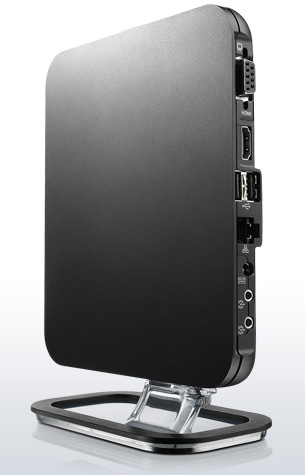
Though the Q150 has an attractive design and satisfying heft, the standout attribute is the machine’s compact size. Lenovo had to forego an optical drive and card reader to trim the inches, but thankfully there are enough ports to connect just about anything: two USB 2.0 ports and an S/PDIF optical output underneath a small flap on the front, and two more USB 2.0 ports, Ethernet, VGA-out, HDMI-out, and headphone & mic jack on the rear.

Accessories

Inside the box, Lenovo includes a stand for using the machine in a vertical orientation, as well as a VESA bracket for mounting it on the rear of a monitor.

The included USB mouse and keyboard work fine, but the wires are so short that you’ll almost have your nose up against your TV screen if you set up the Q150 near your A/V components. The N5901 hand-held control worked okay for point-and-clicking, but typing on it proved annoying, given the tiny keys and lack of backlighting. We would much prefer that the Q150 come with a Bluetooth keyboard and mouse (or at least a backlit remote for use in a dim home theater setting).

Software

Except for McAfee Security Center, we found a desktop thankfully free of bloatware upon the first boot. You’ll want to either activate or uninstall the McAfee suite right away, as you’ll get a nag screen every five minutes or so if you don’t.

Lenovo’s decision to opt for the 32-bit flavor of Windows 7 Home puzzled us, since all the hardware supports 64-bit.
Performance

As a media-playback device, the Q150 performs admirably for its small size and low-voltage components. It had no problems playing 1080p video files and high-fidelity audio files, or streaming Divx files over a Wi-Fi network. However, apart from very basic operations like word processing and light Internet browsing, any task requiring even moderate processing power revealed the Q150’s shortcomings. Despite the Atom processor’s dual cores, the Q150 struggled to keep up when multitasking or crunching lots of numbers. ITunes alone took over four minutes just to install.

Similarly, encoding from one media format to another often moved at a glacial pace, something that will no doubt frustrate those using the Q150 as an HTPC. In many cases, it would be faster to do the transcoding on one’s main desktop or laptop PC and then transfer the media files to the Q150 via a thumbdrive than to let the Q150 do all the work.

Newegg.com sells a version of the Q150 loaded with Windows XP Home for $219, and we can’t help but wonder how a lighter OS load might improve performance.

Conclusion

As a media player, the Lenovo IdeaCentre Q150 performs quite well. The unit’s small stature and multiple mounting options make it a solid choice for installation in a location short on space, and its good looks hold up nicely against home theater components.

On the other hand, its anemic processor delivers some bottom-of-the-barrel performance in multitasking and encoding roles, two areas that power users will sorely miss.

However, if you can live with the Q150’s limitations, the $350 price tag is tough to beat.

Highs:

  • Small footprint and several mounting options
  • Great looks
  • Smooth 1080p video playback
  • Affordable
  • Quiet
  • Convenient OS recovery should disaster strike

Lows:

  • Poor multitasking and encoding performance
  • Lacks good backlit remote
  • No TV tuner

Sabtu, 15 Januari 2011

SAMSUNG Introduces New 9 Series Thin And Light Laptop WIth Stunning Superbright Plus Display And Premium Design

All-new Durable Design and Long Battery Life Create Capable Computing for Professionals On-the-Go

middleImage
Series 9 Series 9
A subsidiary of Samsung Electronics Corporation, today announced the 9 Series, a durable, ultra premium, lightweight laptop computer at the International Consumer Electronics Show in Las Vegas. The 13.3-inch 9 Series offers mobile professionals and power users a sophisticated laptop equally suited for work and entertainment. Thanks to a stunning design, Samsung’s hallmark SuperBright Plus display and Intel performance processing power, the notebook ushers in a new era in mobile computing.

Unparalleled Styling
The 9 Series is made from material known as Duralumin, typically found in advanced aircrafts and offers construction quality twice as durable as aluminum, all while keeping the laptop weight under 3 lbs. To develop the 9 Series with the use of this new material, Samsung created an exhaustive testing process to ensure that the notebook is not only extremely sturdy, but also constructed with the perfect look and feel for technology savvy users.

The 9 Series’ naturally flowing design takes cues from the sleek styling and sophisticated beauty of a premium sports car. The silhouette evokes thoughts of speed and performance with an ultra-thin 0.64 inch profile. Additionally, the naturally flowing arch maximizes the laptop’s ergonomic appeal, making it easier to use and a natural fit for the human grip.

Ultra Vivid Display
The 13.3-inch 9 Series features a LED-backlit screen, offering users the highest quality visual experience expected from Samsung, thanks to SuperBright Plus display with 400- nit brightness. Digital images and multimedia are brought to life on the 9 Series, assisted by a 100,000:1 contrast ratio and true-to-life color reproduction (16 million colors), enriching the computing experience for end users.
Additionally, the wide 160-degree viewing angle allows users to appreciate breathtaking screen images from a variety of vantages points, making the 9 Series easy to use whether in a user’s lap, on a desk or shared in a communal space. The laptop’s ambient light sensor adjusts the display brightness based on surrounding lighting conditions and reduces user eye strain. This innovative feature is complemented by an automatically adjusting backlit keyboard that adapts to darker light conditions with greater illumination.

Innovation Inside
The 9 Series integrates the second generation Intel® CoreTM i5 processor, affording users the latest in performance computer technology. Intel HD graphics, combined with the new processor, deliver crystal-clear visuals, vibrant colors and smooth high-definition (HD) video and audio playback.
Ensuring users are ready anytime anywhere, the 9 Series makes use of Samsung’s new power-efficient lithium polymer batteries, and achieves up to 6.5 hours of battery life on average. Lithium polymer batteries extend the life of the product with double the lifespan for up to three years or 1,000 charging cycles. Additionally, various charging settings, like a “Battery Life Extender Mode” and “Express Charging Mode” empower users with options to get the most from their experience.

Signature Samsung Technology
Samsung’s Support Center ensures all content stays safe and can help troubleshoot any particular problem. Accessible with a keyboard shortcut, the Support Center helps users manage their system settings or arrange for a tech-support web chat. Samsung’s Back-up & Recovery Solution also allows users to create and restore back-ups of system data on the device, or on a network or removable storage device.

Lastly, focusing on convenience and connectivity, the new 9 Series boasts USB 3.0, Bluetooth 3.0, built-in WiMax and utilizes the latest in Wi-Fi and USB Sleep & Charge technologies.

The Samsung 9 Series is scheduled to be available in February 2011, starting at $1,599. All Samsung mobile PC products are available through Samsung resellers and distribution channels, which can be located by calling 1-800-SAMSUNG or by visiting www.samsung.com.

Key Specs:
• CPU: Second Generation Intel® CoreTM i5 Processor 2537M (1.40 GHz, 3MB; turbo up to 2.3 GHz)
• Operating System: Genuine Windows® 7 Home Premium (64 bit) / Windows® 7 Professional (64 bit)
• Memory: 4GB DDR3
• Storage (max): 128GB Solid State Drive (SSD)
• Screen: 13.3-inch HD LED-backlit SuperBright Plus display (400 nit)
• Resolution: 1366x768
• Graphics: Intel HD GT2 Integrated Graphics
• Speakers: 3 watt (1.5W x 2) stereo speakers and 1.5 watt sub-woofer
• Battery: Lithium Polymer; up to 6.5 hours
• Wireless: 802.11b/g/n; WiMaxi
• Weight: 2.89 lbs.